
Differentiated Services Code Point (DSCP) and Network Traffic Prioritization
Differentiated Services Code Point (DSCP) settings play a critical role in networking by classifying and managing traffic. They assign varying priority levels to different types of packets, ensuring that time-sensitive applications like Voice over IP (VoIP) and video streaming perform optimally, even amidst network congestion. These settings help mitigate the impact of bulk data transfers and background tasks on overall network performance.
Time-sensitive packets, such as those used in VoIP or video applications, require timely delivery to function correctly. For example, in a phone call, delayed or lost packets degrade call quality. On the other hand, data packets, like emails, are not time-sensitive. A delay of a few seconds does not impact functionality. This dynamic is akin to missing a flight (time-sensitive) due to a traffic jam caused by the evening rush hour of commuters (non-time-sensitive traffic).
DSCP settings improve VoIP and video service quality by prioritizing time-sensitive packets over less critical traffic. This prioritization reduces delays caused by network congestion, akin to how an ambulance uses flashing lights and sirens to bypass traffic lights on a busy road, ensuring its timely arrival at its destination.
DSCP in Action
Routers and other network devices use DSCP values to sort packets into different queues. High-priority queues for time-sensitive packets, such as VoIP, are processed more frequently, while lower-priority queues may experience delays. However, DSCP values can be altered by network devices through a process called "remarking" or "DSCP rewriting." This can occur for several reasons:
- Intentional Changes: As part of traffic management policies to optimize overall network performance.
- Unintentional Changes: Due to misconfigurations.
- Malicious Changes: To benefit certain network users at the expense of others.
These changes can degrade or completely negate the benefits of DSCP prioritization, significantly impacting user experience.
DSCP Monitoring with MyConnection Server
The MyConnection Server (MCS) traceroute test is designed to detect and report DSCP values across the entire network path, including at each hop and peering point (where two ISPs connect). By monitoring DSCP values, MCS can quickly identify network providers that improve or degrade packet priorities, helping users pinpoint where DSCP settings are being altered.
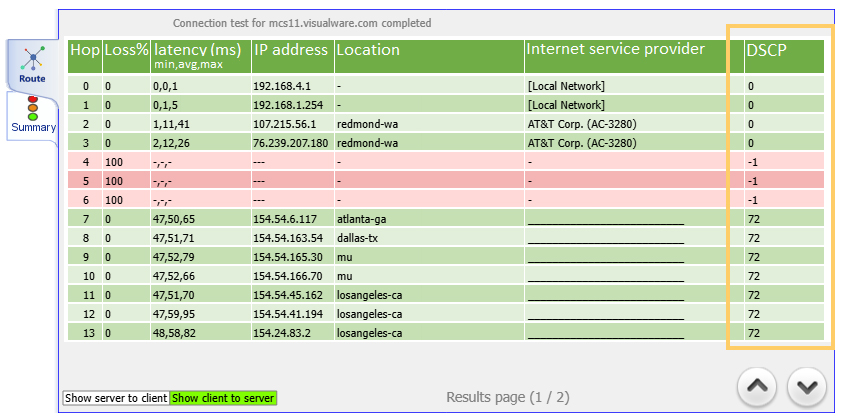
Fig 1. DSCP bits column to detect setting changes across the route.
Configuring DSCP Settings
Setting DSCP priorities involves marking packets with appropriate DSCP values at the network adapter or operating system level. The route test verifies these values, reporting them at each hop along the network path. Any change in DSCP values immediately highlights the network hop or provider responsible for altering the setting, whether for better or worse.
Secure DSCP Management with ACS and CXM Test Appliances
Configuring DSCP values securely requires administrative access to the operating system, a complex process due to security concerns. This is where the ACS and CXM test appliances provide a significant advantage. These platforms are designed without operating systems or filesystems, eliminating vulnerabilities associated with executables or sensitive file types. This makes them highly secure while allowing the safe management of DSCP settings during tests.
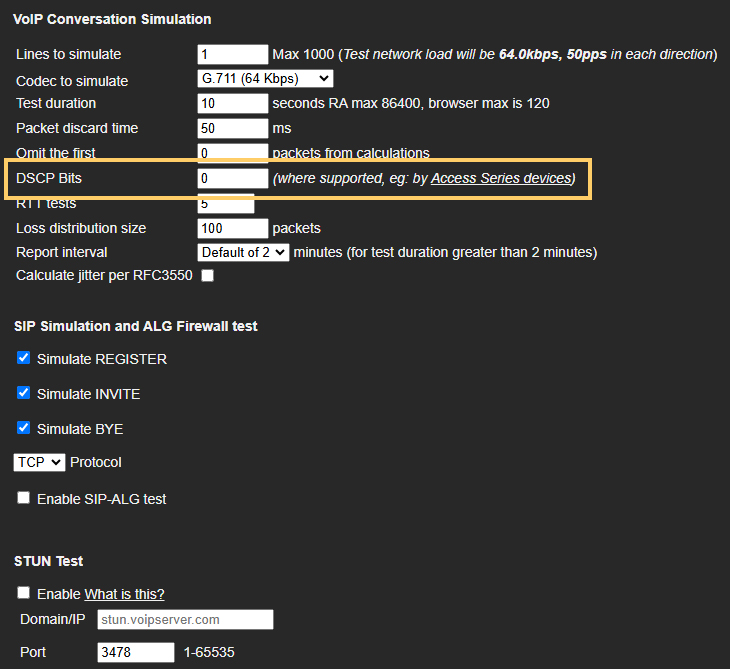
Fig 2. DSCP value settings as part of the MCS VoIP test configuration
With these appliances, users can conduct VoIP tests using different DSCP priority settings, or no DSCP settings at all, to validate and compare network performance metrics such as jitter and packet loss. These tests can also expose network providers that intentionally alter or negate DSCP settings, ensuring transparency and accountability.
Conclusion
DSCP settings are essential for managing network traffic effectively, particularly for latency-sensitive applications like VoIP. Tools like MyConnection Server and its secure ACS and CXM platforms provide invaluable insights into how DSCP settings function across the network, enabling users to optimize their network configurations and identify potential issues with service providers.