
Wireless users say calls break up in the afternoon. Wired users on the same floor say nothing is wrong. The wireless team has good signal readings on every access point and no client complaints in its dashboard. The network team has clean counters on the core. Both are telling the truth, and the problem is still there.
This is the argument that never resolves, because nobody in it is measuring the same thing. Each team can account for its own equipment and nobody can account for the span between them. What is missing is not more monitoring. It is a measurement with known boundaries.
A companion walkthrough, Validating a Switch with a Two-Port Loopback Test, makes a single device the DUT by cabling both ports of one appliance into it. This one does the same thing to a span of network. Put a CXM at each end, and the segment between them becomes the device under test.
Making a segment the DUT
RFC 2544 talks about a device under test because it assumes the thing being benchmarked is a box. The useful part of the idea is not the box, it is the boundary. A DUT is whatever sits between the traffic that goes out and the traffic that comes back, and everything outside that boundary has been excluded by construction rather than by argument.
Two CXM appliances draw the same boundary around a span. One is placed and left alone. The other is moved to wherever the far edge of the segment needs to be. Every port on both appliances offers an independent I-point and E-point, the initiator and the endpoint, so either end can start a test and either end can terminate it, in whichever direction the question needs.
The rule that makes the numbers mean anything is that only one thing changes between runs. Same anchor, same duration, same test profile, different far end. Any difference in the result then belongs to the difference in the path.
Fig. 1 One appliance stays put. The other moves. Only the segment changes between runs.
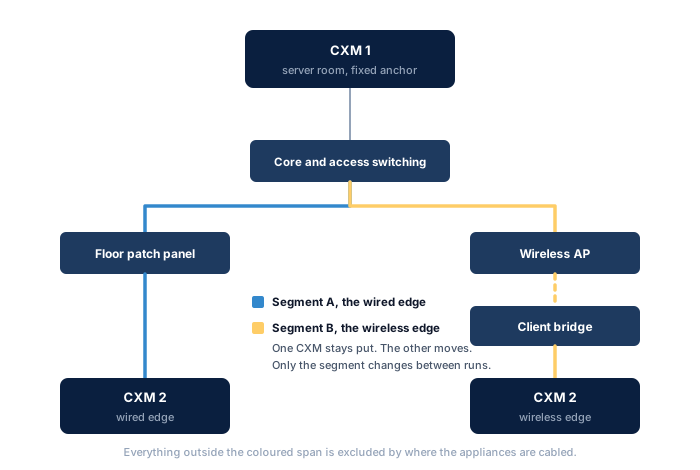
Where the wireless edge actually attaches
The CXM has 1Gbps RJ45 ports, so it does not associate to an access point on its own. At a wireless edge it connects through a client bridge, and that bridge becomes part of the segment under test.
That is worth stating plainly rather than treating as a compromise, because the user has a bridge too. A laptop's wireless adapter, its driver and its operating system sit between the application and the air in exactly the same position. Putting a dedicated bridge in the path keeps the measurement honest about what the edge costs, and unlike a laptop it keeps the test equipment out of the result.
Wired against wireless
The anchor goes in the server room and does not move again. The first run puts the second CXM on a floor port, cabled to the patch panel that serves the same area as the access point. The second run moves it to the wireless edge, behind the client bridge, at the desk the complaints came from. Sixty seconds each, same profile.
Fig. 2 The same assessment across each segment. The wired run clears everything between the server room and that floor.
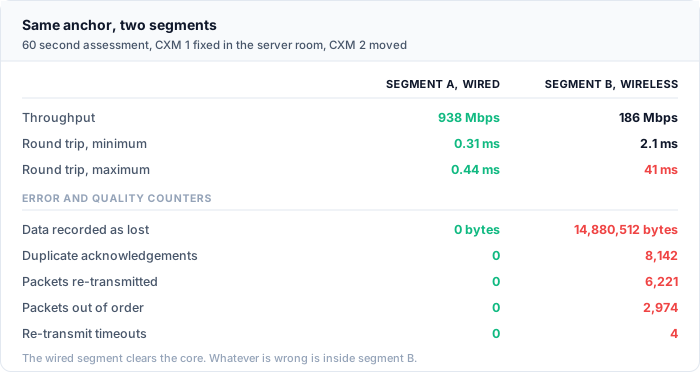
The wired segment comes back at 938Mbps, with a round trip that never leaves half a millisecond and every error counter at zero. That is not the interesting result, but it is the one that does the work. The core, the access switching and the cabling between the server room and that floor are now accounted for. Whatever is wrong is not in there.
The wireless segment is a different picture. Throughput falls to 186Mbps, which on its own proves nothing: wireless is a shared medium and a lower ceiling is expected, not a fault. Read the quality counters instead. Almost 15MB recorded as lost, 8,142 duplicate acknowledgements, 6,221 packets re-transmitted and 2,974 arriving out of order. The maximum round trip reaches 41ms against a minimum of 2.1ms. The path is not slow. It is unstable.
That distinction is why the complaint was about calls and not about downloads. A file transfer absorbs a variable round trip without anyone noticing, because TCP simply takes longer. A voice codec cannot. Its jitter buffer is measured in tens of milliseconds, and a path that swings between 2ms and 41ms empties it while the call is in progress.
Shrinking the segment until it fails
Two results narrow the problem to one span. Moving the far appliance again narrows it further, and the method is a bisection: keep the anchor still, end each run one hop further along, and find the run where the counters change.
Fig. 3 Three runs, each one hop longer than the last. The fault has to live in the hop that the failing run added.
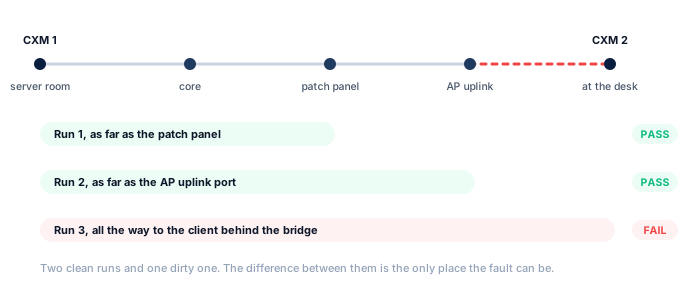
Run one ends at the floor patch panel. Clean. Run two moves the appliance onto the switch port that feeds the access point, which is the AP's wired uplink. Still clean, so the access point is being fed properly and the path up to it is not the problem. Run three goes all the way to the client behind the bridge, and the errors appear.
The fault is in the difference between run two and run three, which is the access point and the air between it and that desk. Nothing else was added. At that point it stops being a network question and becomes a radio one, and it can be handed over with evidence attached rather than as a theory. In this walkthrough a repeat of run three taken a few feet from the access point came back clean, which moved the answer once more, from the access point itself to coverage at that particular desk.
The same method across a DMZ
Segments do not have to be edges. A firewall or DMZ boundary is a common place for performance to disappear and a hard place to prove anything, because the device in the middle is doing work that is supposed to cost something and nobody has agreed how much.
Put one CXM inside and one in the DMZ, with the boundary as the only thing between them, and the cost stops being a matter of opinion. Run the assessment with the policy in place, then again against a rule known to be permissive, and the difference is what the inspection is charging. Inspection that adds two milliseconds of latency is a design decision. Inspection that adds re-transmit timeouts is a capacity problem in the appliance, and those are two very different conversations to have with a vendor.
Working at layer 4 is what keeps that answer clean. The CXM carries no application above the transport, so the boundary device sees a plain TCP or UDP conversation and nothing else. There is no browser, no agent and no operating system in the path to take the blame, which means anything the boundary does to the traffic is visibly the boundary doing it. A UDP assessment across the same pair will also show a SIP-aware policy interfering with media, which is the other thing that tends to be denied on that boundary.
What to hold constant
A two-CXM result is a comparison, so it is only ever as good as the things that stayed the same between runs.
- One variable per run. Change the far end or change the policy, not both. A run that differs in two ways cannot tell you which one mattered.
- The same anchor, physically. Not the same room, the same port. Moving the anchor changes the baseline and quietly invalidates every comparison already made against it.
- The same duration and profile. Sixty seconds is the trial length RFC 2544 recommends, and it is long enough for a timer-driven fault to show up at least once. Shorter runs miss intermittent faults, which are usually the ones being hunted.
- Name what is inside the segment. A bridge, a media converter, a patch lead: if it is in the span it is part of the DUT and it belongs in the write-up. A segment result that does not list its contents cannot be reproduced.
- Repeat the failing run. One dirty result is a reading. Two is a finding.
Why the equipment has to be dedicated
Running this from two laptops measures the laptops. A general purpose machine brings its own network stack, its own driver behaviour, its own interrupt handling and whatever else the operating system decided to do while the test was running.
That matters more across a segment than it does inside a single device, because this measurement is a comparison. Noise contributed by the test equipment does not sit politely in one column. It lands inside the difference between the two segments, which is the exact number the conclusion rests on.
The Access Series appliances have no operating system, no file system and no executables. There is no scheduler competing for the processor and no background process contending for the interface, so a counter that moves reflects the network rather than the host. The same architecture is what makes them safe to carry into a customer's building and cable into a DMZ, since there is nothing on them to compromise.
In conclusion
The teams in the opening argument were not wrong. They were unbounded. Each could account for its own equipment and neither could account for the span between them.
Two appliances draw a boundary that nobody has to take on trust. Whatever falls inside it is the device under test, whether that is one switch, one firewall, one wireless edge or one floor of a building, and the counters that come back describe that span and nothing else. Move one end, run it again, and the fault has one hop fewer to hide in.
The scenario described here is illustrative, built to show how two-appliance segment isolation works and how the metrics relate to one another. The figures are representative rather than drawn from a specific customer engagement.