

Configuration Options
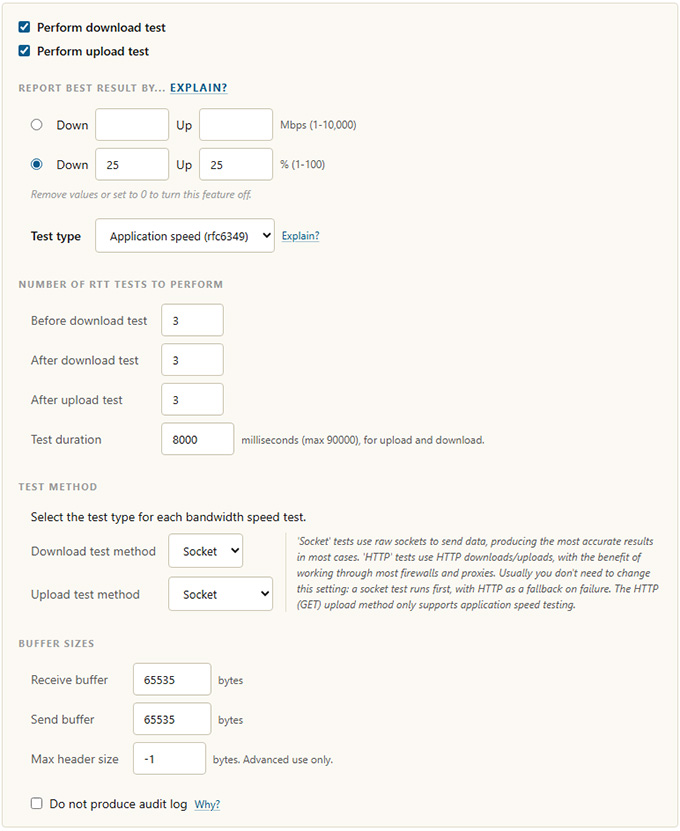
Speed test configuration options
| Option | Description |
|---|---|
| Perform download test | Run a download test from server to client. |
| Perform upload test | Run an upload test from client to server. |
| Report best result by | Reports the best result seen rather than the final one, smoothing over brief dips. Set a target either as an absolute rate in Mbps (1 to 10,000) or as a percentage (1 to 100), for download and upload. Remove the values or set them to 0 to turn this feature off. |
| Test type | Application speed (RFC 6349 end-to-end throughput) or capacity speed (bandwidth capacity limit). These are entirely different measures. |
| Number of RTT tests to perform | How many round-trip time measurements to take before the download test, after the download test, and after the upload test. RTT uses true TCP trip time (not ping); multiple measures let the test assess trip-time variance, where high variance indicates poor connection quality. |
| Test duration | Duration for the download and upload tests, in milliseconds. The maximum is 90 seconds (90,000 ms). |
| Download / Upload test method | Socket or HTTP, selectable per direction. Socket tests use raw sockets for the most accurate results and usually run first, with HTTP as a fallback on failure. HTTP tests work through most firewalls and proxies. The HTTP (GET) upload method only supports application speed testing. |
| Receive buffer / Send buffer | The socket receive and send buffer sizes, in bytes. |
| Max header size | Maximum HTTP memory to allocate, in bytes. Advanced use only; applies to HTTP tests and should not normally be changed. |
| Do not produce audit log | Disables the millisecond-by-millisecond audit log, which can become large on long tests over fast networks. |