

What an API key is
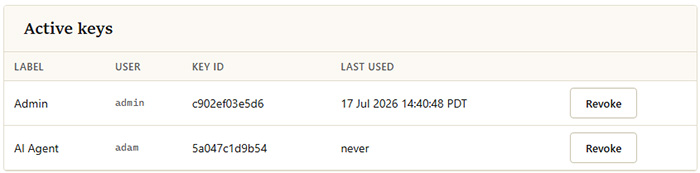
Every HTTP API request is authenticated with an API key. A key belongs to a single MyConnection Server user, and any data returned through that key is limited to what its owning user is permitted to see. Keys are managed on the API Keys page in the administration area, which lists every active key on the server with its label, its owning user, its key ID and when it was last used.
Creating a key
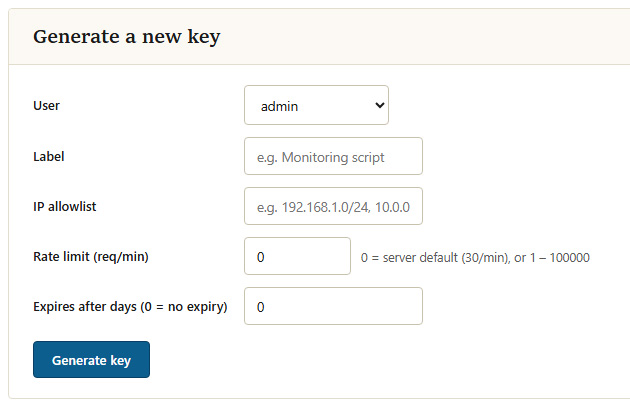
A new key is generated from the create form on the API Keys page. You choose the user the key belongs to, give it a label, optionally set its restrictions and expiry (see below), then generate it. The label is shown in the key list so you can tell keys apart later, so name it after the tool or script that will use it, for example "Monitoring script". The full key is displayed once, at the moment it is created, in the form:
mcs_<keyId>_<secret>Only a hashed form of the secret is stored on the server, so the full key cannot be shown again. Copy it and store it securely when it is created. If a key is ever lost, generate a new one and revoke the old one.
Restricting a key
Each key can carry its own restrictions so that a leaked or misused key has limited reach:
- IP allow list: a comma-separated list of source IP addresses or ranges (for example
192.168.1.0/24, 10.0.0.5) permitted to use the key. Requests from any other address are rejected. Leave it empty to allow any address. - Rate limit: the maximum number of requests per minute for the key, from 1 to 100,000. A value of
0means the key uses the server-wide default rate limit defined in the API settings. - Expiry: the number of days after which the key stops working automatically. A value of
0means the key never expires. Setting an expiry is good practice for keys issued for a trial, a contractor or a short-lived integration.
Revoking a key
Revoking a key disables it immediately. Any request presenting a revoked key is rejected as unauthorised. Revocation is intended for keys that are no longer needed or that may have been exposed; to restore access, generate a new key rather than trying to reinstate a revoked one.
Enabling API access
The API Keys page also carries the toggle that turns HTTP API access on or off for the whole server. The API is disabled by default; keys cannot be used until access is enabled. See API Settings for the related server-wide options.