

Configuration Options
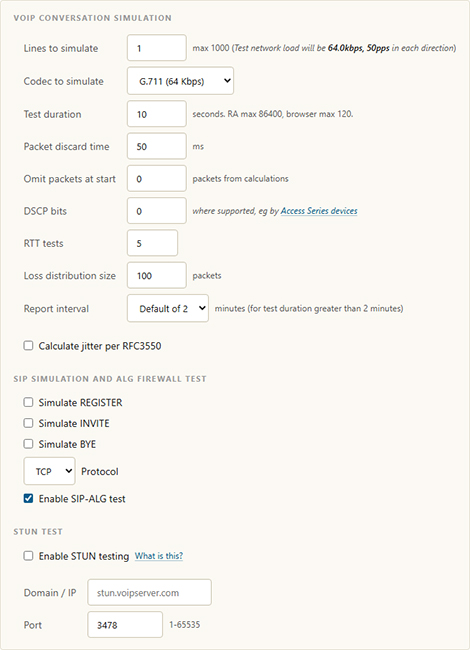
Fig 1. VoIP test configuration options
| Option | Description |
|---|---|
| Lines to simulate | Number of VoIP lines to simulate, up to 1000. This effectively multiplies the payload of the test. |
| Codec to simulate | The payload codec. A custom ("other") option accommodates non-standard codecs if required. |
| Test duration | Length of the VoIP test in seconds. The maximum is 86400 seconds for a Remote Agent (RA) test and 120 seconds for a browser-based test. |
| Packet discard time | Maximum time limit for accepting late-arriving packets, after which the packet is recorded as discarded. |
| Omit packets at start | Number of initial packets to exclude from measurement, compensating for connection ramp time that may affect results. |
| DSCP bits | Decimal values between 0 and 63 that dictate how routers prioritize traffic. Enables time-sensitive data to be prioritized. See Differentiated Services for details. |
| RTT tests | Sets how many round-trip time (RTT) measurements are taken during the test. |
| Loss distribution size | The sample size, in packets, used when measuring how packet loss is distributed across the test, such as whether loss occurs in bursts. |
| Report interval | How often the test posts results to the MCS database. |
| Calculate jitter per RFC3550 | When enabled, jitter is calculated using the method defined in RFC 3550 (the RTP specification) rather than the default calculation. |
| Simulate REGISTER / INVITE / BYE | Individually enable synthetic measurement of the SIP Register, Invite, and Bye transactions. |
| Protocol | The transport protocol used for the simulated SIP signalling (TCP or UDP). |
| Enable SIP-ALG test | Detects the presence of SIP ALG (Application Layer Gateway), which is common in commercial routers and inspects/modifies VoIP traffic to prevent firewall-related problems. |
| Enable STUN testing | Turns on the optional STUN test, which validates WebRTC environments by checking that the configured STUN server is available and responsive. |
| Domain / IP | The domain name or IP address of the STUN server to test, for example stun.voipserver.com. |
| Port | The port the STUN server listens on. Accepts a value from 1 to 65535; the standard STUN port is 3478. |