

Configuration
The usage throttling configuration options for MCS are shown in the image below.
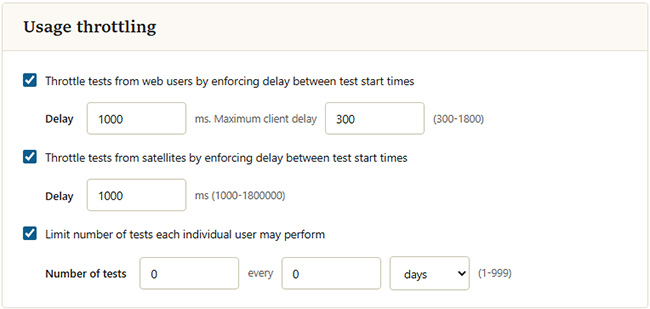
Usage throttling settings
Settings
| Setting | Description |
|---|---|
| Throttle tests from web users by enforcing delay between test start times | When checked, MCS spaces out the start of tests requested from web pages so that no two begin closer together than the configured Delay. Delay is set in milliseconds (1000 to 1,800,000, up to 30 minutes). Requests that arrive while a delay is still in effect are queued and told how long to wait. The Maximum client delay value (in seconds, 300 to 1800) caps that wait: if a client would have to wait longer than this, the test is refused instead of queued and the user is asked to try again later. |
| Throttle tests from satellites by enforcing delay between test start times | Applies the same start-time spacing to tests initiated from satellites. Delay is set in milliseconds (1000 to 1,800,000, up to 30 minutes). The Maximum client delay cap does not apply to satellite tests, so satellite tests are always queued rather than refused. |
| Limit number of tests each individual user may perform | Caps how many tests any single user may run within a rolling time window. Set the Number of tests (1 to 999) and the period length (1 to 1440), then choose whether the period is measured in minutes, hours, or days. Once a user reaches the limit, further tests are blocked until the window elapses. |
Note: Any changes to these settings will not be saved until you click the