

How it works
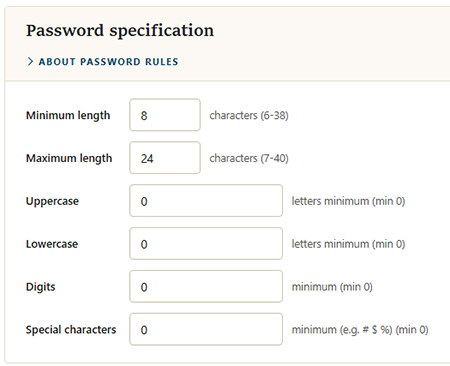
The password specification sets the complexity rules that every user password in MyConnection Server (MCS) must satisfy. The rules are enforced whenever a password is created or changed.
Note: These rules apply to user passwords only. They do not apply to the work order or NQC client passcodes.
Rules
| Rule | Description |
|---|---|
| Minimum length | The fewest characters a password may contain. Must be at least 6. |
| Maximum length | The most characters a password may contain. Cannot exceed 40. |
| Uppercase | The minimum number of uppercase letters required. Set to 0 to not require any. |
| Lowercase | The minimum number of lowercase letters required. Set to 0 to not require any. |
| Digits | The minimum number of digits required. Set to 0 to not require any. |
| Special characters | The minimum number of symbols required, for example #, $, or %. Set to 0 to not require any. |
Note: The combined total of the required uppercase, lowercase, digit, and special-character counts cannot exceed the minimum length. For example, if the minimum length is 8, the four requirements together cannot add up to more than 8.
Adjust the values and click
Maximum expiry
The Maximum expiry setting caps how many days a password may be set to remain valid before it must be changed. It is the upper limit for the "Enforce password change after N days" option that can be set for an individual user on the Manage Users page — a per-user password expiry can never be set higher than this value.
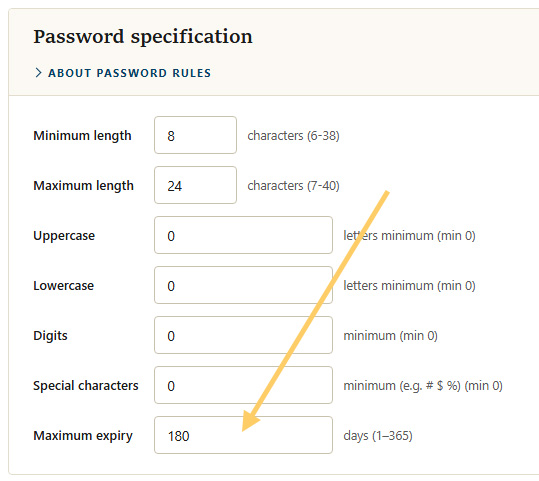
Note: The value is measured in days and must be between 1 and 365. Setting a user's password expiry above this maximum is rejected.