

Overview
MyConnection Server (MCS) is designed to be very secure out of the box. The following best practices are recommended to further enhance security: restrict ports, enable HTTPS, two-factor authentication, Access Control Lists, and session identifier hygiene.
Restrict Ports
Restrict ports on the server to only those required by MCS for the admin interface and testing.
By default, MCS tries to bind to port 80, or 443 for HTTPS. If MCS uses another port, it can be viewed in the General Configuration section. Each test type has its own port requirements, also viewable there.
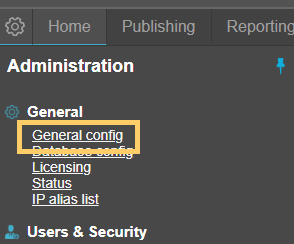
The default ports MCS uses for testing are:
| Protocol | Ports |
|---|---|
| TCP | 20000–20001 |
| UDP | 20000–20001 |
| TCP/UDP | 5060 |
| UDP | 8090 |
Enable HTTPS
MCS supports SSL certificates to enable HTTPS. See the Enable HTTPS tutorial for instructions on generating and applying a certificate.
MCS still requires HTTP access even when HTTPS is enabled. MCS network connection satellites (NCS) communicate over HTTP only, as the overhead of HTTPS affects testing accuracy. This does not affect the security of the admin interface or data.
MCS operates on the principles of a custom WAF-based web server, validating all inbound URLs and rejecting those not compliant with its whitelist policy rules (including user-defined ACL rules), independently of browser conformance rules. Any non-satellite HTTP request is redirected to HTTPS automatically.
Two-Factor Authentication
To enable two-factor authentication, check the box in the security settings section of MCS.
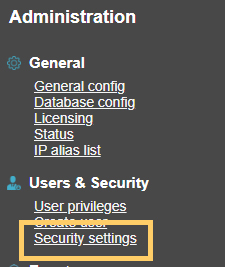
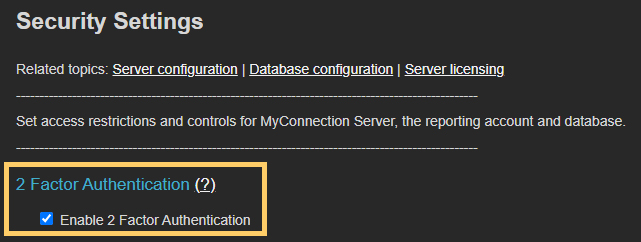
When new users are created in MCS, an email address is required. This email address is used to deliver the 2FA OTP code.
Access Control List (ACL)
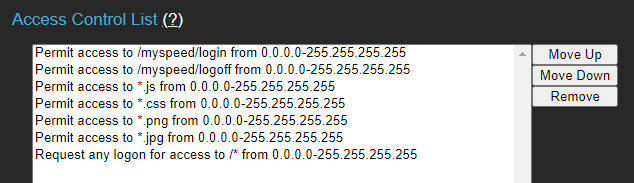
The ACL controls access to specific sections of MCS based on IP addresses or IP ranges. It is found in the security settings.
The most common usage is to enforce a login requirement. By default, MCS allows public access for non-administrative requests.
Enforcing Login for All Pages
The configuration below grants access to the login page and its associated resources, while requiring authentication for all other pages.
Allowing Public Test Pages
MCS can host public test pages (e.g., directing users to run a VoIP test). The ACL modification below enables public access to test pages while still requiring login for all administration pages.
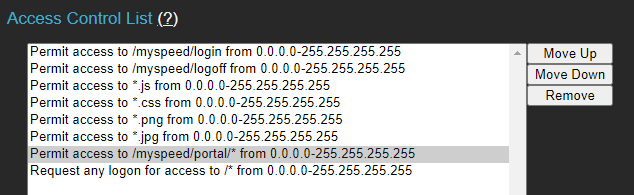
The examples above use the full IP range. Restricting access to specific IPs would further enhance security.
Session Identifier
The MCS satellite uses HTTP to efficiently handle an infrastructure that can scale to over 100,000 test locations. Test data is structured to exclude private information — all metrics are reported as simple numerical values without ownership context. Non-result data elements such as the public IP address, ISP name, network type (Wi-Fi or wired), and session ID are also structured to lack ownership context.
The session ID serves as an alias tag name, providing a consistent label across one or more test results for selecting a common set of results for a unified report. For example, a session ID might be an airport name where testing began. In automated tests that run over days, weeks, or months, the session ID aggregates individual tests into a single report.
Note: Although session IDs are designed to be tag aliases without private information, they are user-defined and can include additional data. For instance, a browser-initiated test might request an email address before starting, and if that address is included in the session ID, it would contain private information. As a best practice, obfuscate or omit private data from session IDs.