

Download the TAR/RPM
Click here to download the latest MyConnection Server for Linux (TAR).
For more information (and the RPM file) see the download page in full or the new release notes.
Untar the Install Script
Untar the install script using the command below.
tar -xvf myconnectionsvr.tarRun the Configure Script
Run the mcs_configure.sh script using the commands below.
sh mcs_configure.shand on Solaris or FreeBSD
ksh mcs_configure.shNote: To install MCS as a regular user (not a super user) use sh mcs_configure.sh nosu. However, we recommend installing as a super user.
Working through the Install Script
The install script will prompt the user with some questions. These are detailed below.
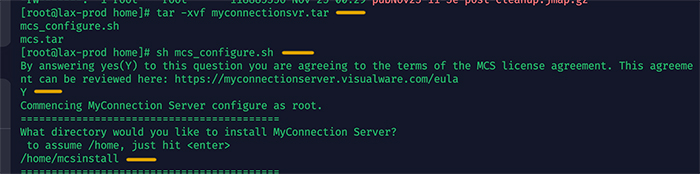
License agreement and installation directory
Rejecting the license agreement (N) will stop the installer. Type (Y) to accept the license agreement. Copy and paste the link into a browser to review the agreement.
Hit enter to accept the default directory or specify a new directory, for example /home/mcsinstall
Note: If an installation of MCS already exists in the chosen directory a prompt will appear to confirm the overwrite.
Assign memory
Decide how much memory to assign to MCS. The suggestion will always be half of the total memory on the machine, however choosing no less than 6GB is our recommendation if available.

Run Automatically
To ensure MCS starts on every reboot answer Y to this question.

Browse to the Main Menu
The installation will end with an IP:Port combination where the MCS main menu will be running. An alternate IP:Port can be chosen in the MCS General Config.
